Transforming accessibility flags into action
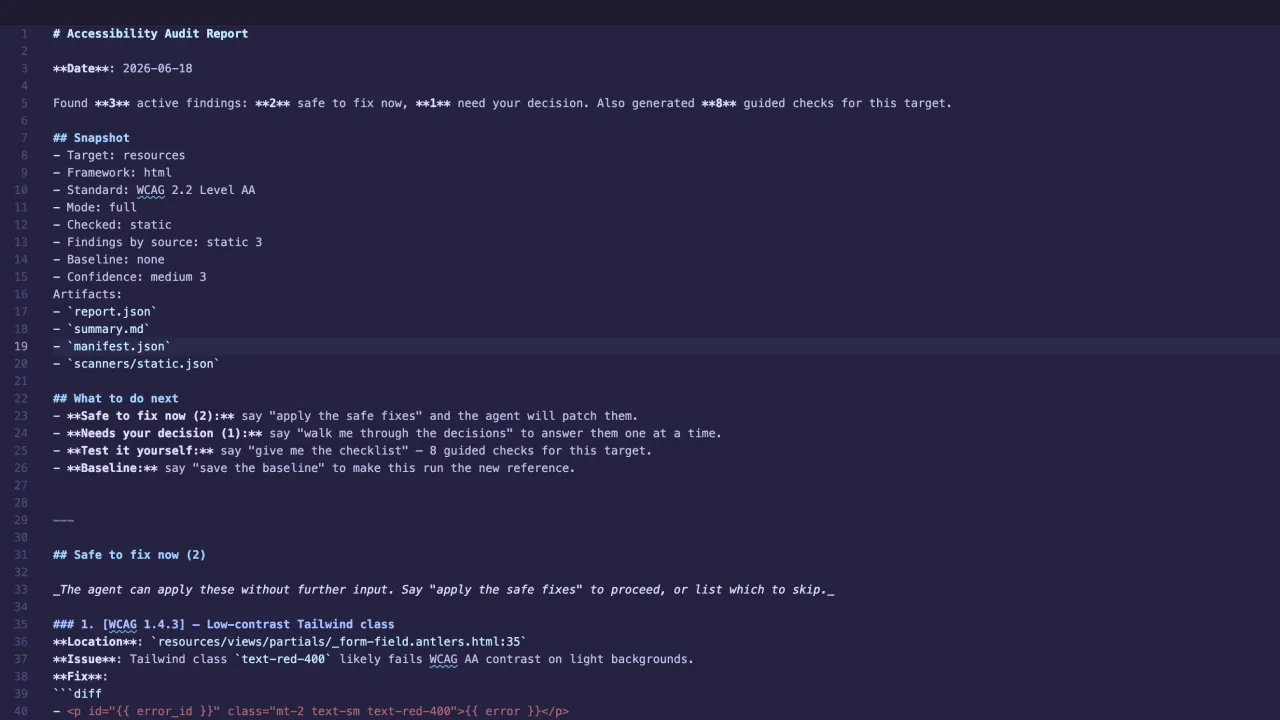
a11y-audit is a WCAG 2.2 AA audit skill for coding agents that combines source analysis, browser testing, interaction journeys, and guided human review.
An accessibility assistant
a11y-audit helps developers audit websites and web applications from coding environments such as Codex and Claude Code.
It reviews accessibility by examining several layers: the source code, the rendered page, interaction states, and design tokens. The tool then groups its findings in a remediation workflow (rather than a more standard list of violations) and provides the developer with a set of next steps.
Taking action
Accessibility audit tools usually return lists of issues ranked by severity. While this communicates how serious an issue may be, the user is left to determine the action required to fix it. Fixes can vary broadly: adding type="button" is a simple task, but verifying focus order or a screen-reader announcement needs human input.
Since the goal should be to fix all accessibility issues, ranking by severity really only provides usable information if the volume of issues is so large that one has to triage. For me, this isn't a scenario I need to plan for.
In this a11y-audit skill, findings are grouped by the next possible action:
- Safe to fix now — changes an agent can apply after approval.
- Needs your decision — issues that need human review of content, design, or structure
- Test it yourself — outstanding items to be checked that can't be automated
Other tools exist that audit accessibility, but I couldn't find any that support their audits with next step actions. When I produce an automated audit, I want to be able to immediately and efficiently act on the information in the report. a11y-audit is intended to support a collaboration between the developer and the coding agent.
The central idea
Organization of fixes and giving the user a means to take action became the defining feature of the tool:
Issue fixes are the primary organizing principle. Severity is supporting information.
Every finding by the tool should answer these questions:
- Can the agent fix this safely?
- Does it need a human decision?
- Must someone test it directly?
This principle helped define the scanners, finding schema, report structure, command-line interface, CI behaviour, and the conversation the agent has with the user.
## Needs your decision (1)

_Each item asks one question. Say "walk me through the decisions" and the agent will go one at a time._

### 1. [WCAG 4.1.1] — Duplicate id attribute
**Location**: `resources/views/partials/_form-field.antlers.html:23`
**Issue**: Duplicate id="{{ name }}" (first seen at line 10). HTML requires ids to be unique within a document.
**Decision needed**: Which element keeps the id, and what should the other one be renamed to? (Search the codebase first — CSS selectors, JS lookups, aria-labelledby/aria-describedby, label[for], and anchor #hashes may depend on it.)
**Current code**:
```
id="{{ name }}"
```
How it works
1. Gathering evidence
The skill combines four kinds of analysis:
- A Python source scanner detects issues that are visible in HTML and common frontend frameworks.
- Playwright and axe-core inspect the rendered page and computed styles.
- Scripted journeys test states reached through interactions, such as opening a dialog or submitting an invalid form.
- A token scanner checks supported design-token sources for contrast, focus-indicator, and color-only problems.
These findings are normalized into a common schema, mapped to WCAG criteria, assigned confidence, de-duplicated, and routed into the appropriate action group.
2. Keeping the LLM in check
I avoided making the language model the source of truth for accessibility detection. The agent can coordinate the workflow and apply approved changes, but it can’t work on issues that require user input.
3. Turning the toolkit into a unified product
An early version worked with a collection of individual scripts. This was good for MVP development, but the overall result felt fragmented.
The final product centers around two primary commands:
auditruns the scanners and creates the report package.cicompares a run against a baseline and produces a pull-request summary.
There are still lower-level scanners available for fixtures and debugging, but most users can treat the skill as one unified audit product.
Saving a new baseline (a saved reference audit used to evaluate later findings) is always a separate and confirmed action. This prevents a newly introduced issue from accidentally becoming a reference point.
4. Designing a clear handoff
The full report begins with listing the outcome, what was checked, where the artifacts live, and what actions the user can take next.
To continue the conversation, the developer can use the same language as in the report:
- “apply the safe fixes”;
- “walk me through the decisions”;
- “give me the checklist”;
- “save the baseline”;
- “run the CI check”.
This shared language makes it easier for the user to take action on issues in the report.
5. Protecting behavior with fixtures
Many protections exist to ensure success:
- Snapshot-based fixtures cover scanner, triage, reporting, baseline, source-mapping, and runtime behavior.
- The fixture suite checks supported frameworks, malformed inputs, report contracts, authentication redaction, regression comparison, stateful journeys, and other high-risk behaviors.
- Browser verification also uses the Playwright and axe-core runtime workflow.
This is a mouthful, but what it means is that the goal is to not only test whether scanners find issues, but also to protect how the tool groups findings and what it allows an agent to do next.
## Test it yourself

_These require a human in the browser or with assistive tech — the things automated scanners can't reliably check._

### Guided checklist (8)

#### 1. Keyboard tab order through the audited page or flow
**Capability**: `keyboard`
**WCAG**: 2.1.1, 2.4.3
**Context**: Use the current page-load state and every audited interaction state.
**How to test**:
- [ ] Press Tab from the browser chrome into the page and keep tabbing until focus returns to the browser or the end of the flow.
- [ ] Repeat with Shift+Tab to verify the reverse order.
**Expected result**:
- [ ] Every interactive element is reachable in a logical visual order.
- [ ] No keyboard trap appears and focus never jumps to hidden or inert UI.
Key decisions and trade-offs
Severity is secondary
- A critical issue can still require a human decision. A lower-severity issue can be completely safe to patch.
- Severity communicates urgency, but it never overrides the evidence required to fix the issue.
Runtime evidence
- Browser testing can reveal a real problem without identifying the component that produced it.
- Runtime results are marked as safe fixes only when the source mapping is sufficiently reliable. Otherwise, the report keeps the issue visible and explains the uncertainty.
Stale vs fixed
- Findings that disappear from a later scan are marked stale rather than fixed.
Manual testing
- The tool does not hide the limits of automation.
- The tool generates guided keyboard, screen-reader, visual, and browser checks with steps and expected outcomes.
- Criteria outside the audit’s automated coverage remain visible under Not checked.
- A clean scan can never be mistaken for proof that a product is accessible.
Conservative fixes
- To reduce the potential for error, the skill is deliberately conservative. This means some valid issues can remain in the decision or manual-review paths.
Portability
- Because improved precision would add dependencies and framework-specific complexity, the base source scanner uses the Python standard library, which makes it easy to run in new repositories.
What exists now
The repository contains a working, evolving accessibility audit skill with:
- static analysis across common frontend frameworks;
- Playwright and axe-core runtime testing;
- stateful interaction journeys;
- supported design-token checks;
- framework-specific repair guidance;
- confidence-aware source mapping;
- baselines, fingerprints, and waivers;
- changed-files CI gating;
- Markdown and machine-readable reports;
- guided manual testing;
- packaged installation for agentic coding environments.
Each audit creates a self-contained artifact package containing the full report, normalized JSON, a concise summary, scanner output, a manifest, and supporting evidence where available.
## What to do next
- **Needs your decision (8):** say "walk me through the decisions" to answer them one at a time.
- **Test it yourself:** say "give me the checklist" — 8 guided checks for this target.
- **Baseline:** say "save the baseline" to make this run the new reference.

---

## Needs your decision (8)

_Each item asks one question. Say "walk me through the decisions" and the agent will go one at a time._

### 1. [WCAG 2.1.1] — Non-interactive element with click handler
**Location**: `/Users/colin/Sites/kicobi-starter-kit/resources/views/components/ui/_dialog.antlers.html:31`
**Issue**: <div> with onClick is not keyboard-accessible. Use <button type="button"> or <a href> instead.
**Decision needed**: Is this an action (replace with `<button type="button">`) or navigation (replace with `<a href="…">`)? The closing tag also needs to change — the scanner only captured the opening tag.
**Current code**:
```
<div x-show="open" x-transition:enter="ease-out duration-200" x-transition:enter-start="opacity-0" x-transition:enter-end="opacity-100" x-transition:leave="ease-in duration-150" x-transition:leave-sta…
```
What I learned
As in so many creative projects, pushing against boundaries is a sure-fire way to improve a product. Showing what wasn’t checked makes the report more trustworthy, and making manual review to a primary workflow helps make the tool more useful and instructive than what an automated score alone could achieve.
The future
The tool could be updated to use:
- more targeted guided tests for individual screen readers
- improved evidence capture for complex interaction states
- broader design-token formats
- parser-backed static analysis to improve precision
The main idea would remain the same: new capabilities should increase the usefulness of the tool without weakening its current strategy of safe automation and human judgment.
Where to find it
The current version is available at https://github.com/studiokicobi/a11y-skill.
Independent projects
Transforming accessibility flags into action
Current project